What is set extension in VFX? Methods and what to shoot on set
Set extension explained: six methods from matte painting to LED volumes and AI plates, what to capture on set, the post workflow and why extensions look fake.
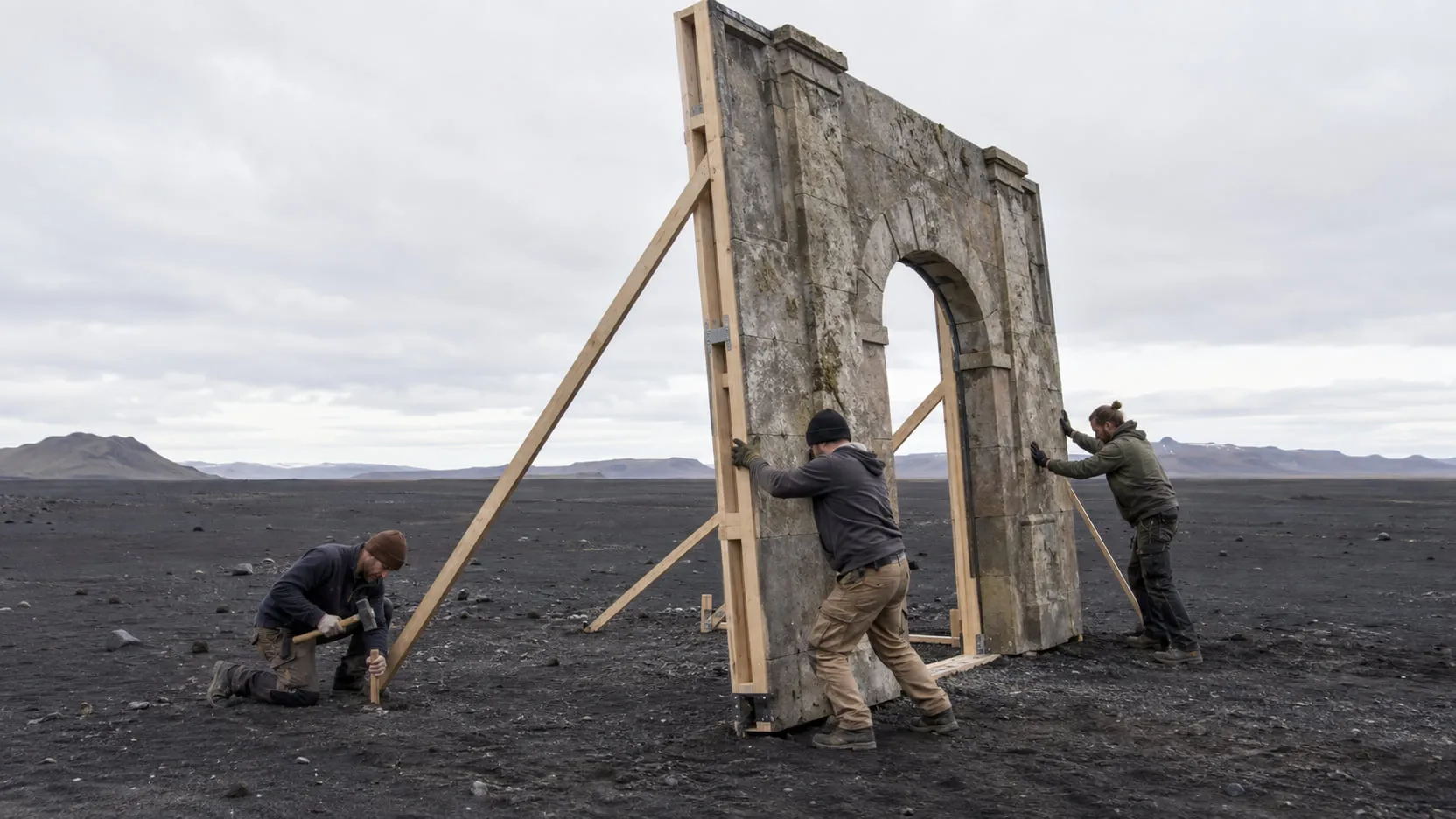
Set extension is continuing a physical set or location beyond what was built or photographed: more stories on a facade, a longer street, a skyline where there was a parking lot. The rest of the world is added in post with a matte painting, a 3D environment, projected photographs or generated plates, composited behind or around the real set so it moves with the camera. It lives or dies on the camera track and on matching perspective and light, which is why the most important work happens on set, not in the comp.
Below: where it’s used, the six main methods, what to capture on the day, the post workflow, what gives an extension away, and where AI fits today.
What is set extension, and where is it used?
Set extension is the compositing job of making a set or location look larger, older, newer or somewhere else, while the actors and everything they touch stay as shot. The production builds what the cast touches and the camera gets close to, usually a ground floor, a doorway or a few meters of street, and the extension carries the frame from there.
It shows up in more places than big fantasy films:
- Budget sets. A courtyard built to 3 or 4 meters, with the upper floors, roofs and sky added in post.
- Period films. A street that needs to read as 1760 or 1920 all the way to the horizon, not just in the two buildings the art department dressed.
- Period conversion. Taking the modern world out of a real location, like cranes, satellite dishes, cables, parked cars and street furniture, and putting period buildings, ships or signs back in. This is part cleanup, part extension.
- Fantasy, and locations you can’t control. Castles above the gate, a skyline that is the wrong city, a field that should run to mountains.
Set extension overlaps with background replacement and sky replacement, but an extension has to continue the real set: same architecture, perspective, materials and light, joined at an edge nobody notices. When the wider world also needs people, like an army below the castle walls or a full stand, the extension usually goes together with crowd multiplication.
What are the main ways to do a set extension?
There are six common methods, and the choice comes down to how much the camera moves and how much the extension has to change with it. A locked-off shot can take a painting; a long crane move through a street needs geometry.
| Method | When to use it | Cost and skill | Main risk |
|---|---|---|---|
| 2D matte painting (a painted or photo-built still, tracked in 2D) | Locked-off shots, nodal pans, small moves, distant backgrounds | Lowest. A painter and a compositor | No parallax: it slides as soon as the camera travels |
| 2.5D camera projection (the painting projected through a camera onto simple geometry) | Moderate dolly, crane or drone moves at mid-to-far distance | Medium. Needs a solved camera and basic 3D in the compositor | Stretching when the camera moves far from the projection point; gaps behind geometry |
| Full 3D environment (modeled, textured, lit and rendered) | Long moves with strong parallax, many shots in one place, changing light | Highest. Modeling, texturing, lighting and render time | Reads as CG when materials, light or detail fall short |
| Photogrammetry and lidar (the real set or location scanned and rebuilt) | Continuing a real set or location faithfully; geometry that must line up with the plate | Medium to high. Scanning time on the day plus processing | Needs access and time on set; scans need cleanup; light is baked into the textures |
| LED volume, in camera (the extension displayed on an LED stage and shot for real) | When the production can shoot on an LED stage and wants final pixel plus interactive light on the actors | High, and up front. The stage and finished real-time environments before the shoot | Decisions move into pre-production; hard to change afterward; moiré on the wall |
| AI-generated plates (a still or clip generated from a description or reference) | Static shots, nodal pans, small moves, distant views, fast look development | Low per shot. Still needs a compositor to integrate it | No real depth or camera; parallax on long moves; invented detail that changes between shots |
The tools behind three of those rows:
- Camera projection is standard in Nuke. Foundry’s Nuke 17.1 documentation describes cameras that can “project a 2D still image or image sequence onto geometry in the scene”, using the Project3D node, and notes that a projection camera “can receive camera data tracked from the original shot” (Foundry). That is the trick of 2.5D: the painting sits on cards or rough buildings, and the tracked camera gives it parallax.
- LED volumes move the extension from post to the shoot. Epic’s Unreal Engine 5.8 documentation defines in-camera VFX as relying on “a mixture of LED lighting, live camera tracking, and real-time rendering with off-axis projection”: the part of the wall inside the camera’s view shows the environment from the camera’s perspective, while the rest lights and reflects on the physical set. ILM’s StageCraft LED volume, used on The Mandalorian, is a widely documented example (ILM). The same docs warn about moiré when focus falls on the LED panels.
- Scanning gets you the real set’s geometry. Epic’s RealityScan (called RealityCapture until June 2025) combines aerial photos and lidar with ground-level data to build 3D models (Epic Games).
Many shots mix methods: a projected painting for the middle distance, a 2D sky behind it, a scanned set piece at the join.
What should you capture on set for a set extension?
Capture everything the compositor would otherwise have to guess: the camera, the light, the geometry and a clean view of the set. Little of it costs much on the day; all of it is expensive to reconstruct later.
On-set checklist
- Camera data for every setup: lens focal length, sensor or film back size, focus distance, T-stop, camera height and tilt. Nuke’s CameraTracker asks for focal length and film back size “if they are known” (Foundry).
- Lens distortion grids shot on each lens, so the plate can be undistorted before tracking and the extension redistorted after.
- Tracking reference near the join and on things that don’t move: markers on the top of set walls, or natural detail with contrast. Keep markers off the actors and easy to paint out.
- Clean plates: a pass of each setup without actors, same move if you can repeat it. See how to make a clean plate.
- HDRI and light reference: a bracketed 360-degree HDRI from the set position, a gray and a chrome ball in frame for a few seconds, and a note of the time and sun direction.
- Reference photos: the set’s materials up close, the edge where the build stops, and the location in every direction.
- Measurements or a scan: the height of the built edge, a few key dimensions, and a lidar or photogrammetry scan if time and budget allow.
- Blue or green only where the edge is complex: above set walls where hair, foliage, smoke or a crowd crosses the line. A hard roofline against open sky is often easier to roto than to key.
The most useful single note is where the build stops. A compositor who knows the join sits on the cornice line can plan the extension around it.
How is a set extension done in post, step by step?
In post, you solve the camera first, build the extension to that camera, then spend most of the time making it sit in the plate. Every later step depends on the track.
- Prep the plate. Conform the shot, undistort it with the lens grids, and make a degrained working copy if you’ll paint on it.
- Track and solve the camera. In Nuke, CameraTracker tracks camera motion “to create an animated 3D camera or a point cloud”; mask out moving objects such as actors so they don’t confuse the solve (Foundry). In After Effects, the 3D Camera Tracker (Effect > Perspective > 3D Camera Tracker) extracts camera motion and 3D scene data so 3D layers can sit in the footage (Adobe). Blender’s solver needs at least eight tracks common to two keyframes with noticeable parallax between them, and has a Tripod mode for shots where the camera only rotates (Blender manual).
- Set up the scene. Set the ground plane and scale from your measurements, and check the solve with test cards on the set. If a card slides, fix the track before you build.
- Build the extension. Paint, project or model it, working from clean frames and reference photos so materials continue across the join.
- Matte the join and the foreground. Roto the actors and anything that crosses the extension, and hide the seam along a real line: a cornice, a roof edge, a change of material.
- Integrate with depth. Add atmospheric haze that increases with distance, match defocus to the lens and focus distance, and match black levels and contrast to the plate at the same depth.
- Match the light. Sun direction, color temperature and shadow softness have to agree with the real set, including shadows that cross the join.
- Finish like the plate. Redistort, add motion blur that matches the shutter, and regrain with grain sampled from the plate.
- Review at speed and after the grade. Parallax errors and flicker show in motion; a contrast push in the grade can reveal a seam that was invisible before.
Why do set extensions look fake?
Set extensions look fake when the extension disagrees with the plate about the camera or the light. Audiences can’t name the error, but they feel it:
- Perspective. Vanishing points or the horizon line don’t match the camera height and lens, so the upper floors lean the wrong way.
- Parallax. The extension moves as one flat layer while the real set shifts in depth, or it slides a few pixels against the set on a move.
- Light direction. The sun hits the extension from a different side than the real walls, or shadows stop at the join.
- Haze. Distant buildings as crisp and contrasty as the foreground. Real air lifts blacks and softens detail with distance.
- Scale cues. Windows, doors, bricks and people at the wrong size for their distance make a city read like a model.
- Too-sharp detail. A painting or generated plate sharper than the lens could resolve at that distance, with no grain and no defocus.
- Nothing moves. A frozen world behind a live set. Distant smoke, flags or traffic, even subtle, helps.
- A visible seam. A change in color, texture or grain exactly where the build stops.
Where does AI fit in set extension today?
AI-generated plates are useful today for static shots, nodal pans and small camera moves, and for exploring a look quickly. A generated image can give you a period street, a skyline or a mountain range to paint over, project or composite directly when the camera barely moves.
The hard case is a long move with strong parallax. A generated still is a flat picture with no depth and no camera; on a dolly or drone move, the near and far parts of the world have to shift against each other, and a flat plate can’t. You can project it onto geometry like any matte painting, which works until the camera reveals what the picture never showed. Generating a clip that follows your exact camera path, in sync with the real set, is still the difficult part. Consistency is the other weak point: a generated building has to be the same building in the reverse angle.
Use generated plates where a painting would have worked, keep the actors’ pixels untouched, and keep the track, matte and light match in the compositor’s hands. On region edits versus re-rendered frames, see generative video editing vs plate-preserving VFX.
Where nolanlabs fits
Set extension is part of nolanlabs Environment work: keep the actors, change the world, whether that’s a new background, a longer street, a different century or another sky. You describe the world or bring a reference plate, and mark anything that must stay. The actors and the camera move stay as shot; only the world past the set’s edge changes. It comes back as the comp, the extension layer and the matte, so the haze, the edge and the grade stay yours to adjust in your own compositor. When the empty street also needs people, that’s Crowd & scale on the same shot.
The honest limit: long camera moves with strong parallax are the hardest case for any extension, ours included. The new world has to move exactly as the real set does, and that needs a solid camera track. We say before the run when a shot is one of those. Access is by invitation; the shot where the set stops too soon is the one to bring to a demo.
An extension is only as good as what was recorded on the day: lens, camera height and the light. With those and a solved track, the build is the easy part; the time goes into haze, scale and the line where the real set ends.
Questions
- What is set extension in VFX?
- Set extension is adding to a physical set or real location in post so it looks bigger than what was built or photographed: upper floors on a two-story facade, the rest of a street, a city on the horizon. The added part is a matte painting, a 3D environment, projected photos or a generated plate, composited so it moves with the camera and matches the light of the real set.
- Do you need a green screen for a set extension?
- Not always. Where the join between set and extension is a clean, hard edge, such as a roofline or a wall top, a compositor can roto it or hide the seam along an architectural line. A blue or green screen earns its place where the edge is complex: hair, foliage, smoke or crowds crossing the line where the set ends.
- How do you do a set extension in After Effects?
- Track the shot with After Effects' 3D Camera Tracker to get a camera that matches the real move, then place the extension on 3D layers positioned in the solved scene. Matte the real set and anything in the foreground, then match haze, defocus, light and grain. For moves with strong parallax, a single flat painting will slide, so the extension has to be split into layers at different depths or built in 3D.
- Can AI do set extensions?
- As of September 2026, generated plates work well for static shots, nodal pans and small camera moves, where a flat image doesn't need to show parallax. Long moves where the foreground and background shift against each other are still hard, because a generated image carries no real depth or camera. The extension still needs a track, a matte and a compositor's light match to sit in the shot.
Sources
- Projection Cameras — Nuke 17.1v2 documentation, Foundry — accessed 2026-09-28
- Project3D — Nuke 17.1v2 Reference Guide, Foundry — accessed 2026-09-28
- Camera Tracking — Nuke 17.1v2 documentation, Foundry — accessed 2026-09-28
- Tracking 3D camera movement in After Effects — Adobe After Effects Help — accessed 2026-09-28
- Solve — Blender 5.2 LTS Manual — accessed 2026-09-28
- In-Camera VFX Overview in Unreal Engine — Unreal Engine 5.8 Documentation, Epic Games — accessed 2026-09-28
- The Mandalorian (Season 2) — Industrial Light & Magic — accessed 2026-09-28
- RealityScan 2.0: New release brings powerful new features to a rebranded RealityCapture — Epic Games (June 17, 2025) — accessed 2026-09-28
Written by the nolanlabs team. nolanlabs does AI shot work for post-production; product names mentioned belong to their owners. Tool details were accurate on the date shown above — check the vendor’s documentation before relying on them.